


Ever wondered how an app like Yuka manages to scan a product barcode and instantly tell you whether it’s “healthy” or “not so great”?
It’s kind of like having a nutritionist in your pocket, but powered by smart algorithms and a massive product database.
If you’re planning to build your own version of Yuka, a food and cosmetic scanner app that helps users make healthier choices, this guide will walk you through everything: features, tech stack, cost, and even marketing ideas to make your app stand out.
Table of Contents
What Makes Yuka So Popular?
Let’s face it, most people don’t read ingredient labels. They just want to know one thing: Is this good for me or not?
Yuka solves that problem beautifully. The app scans a product’s barcode, checks its database, and instantly gives it a score based on nutritional value, additives, and ingredients. For cosmetics, it shows the potential health risks of each component.
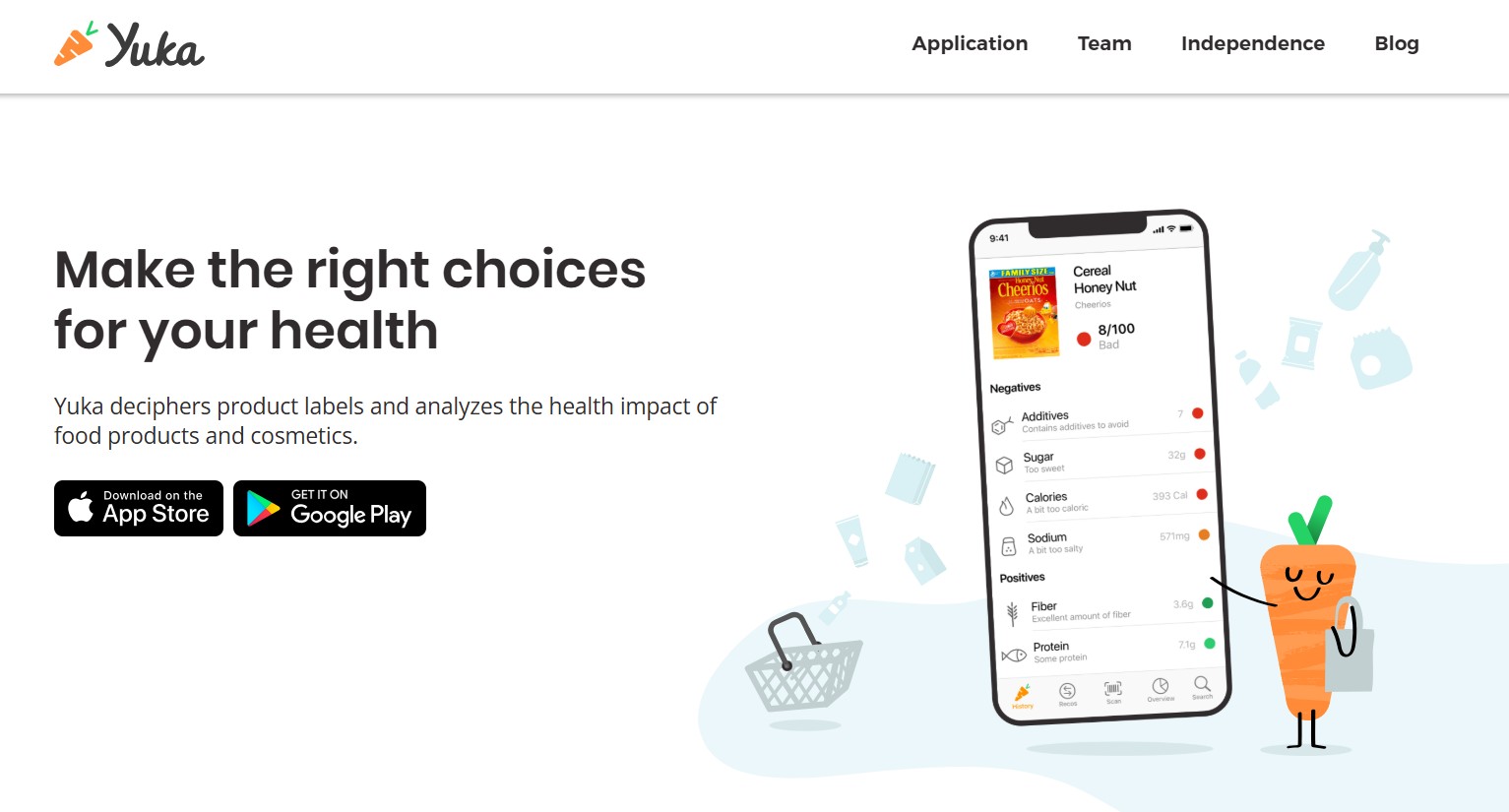
What makes Yuka successful isn’t just the scanner; it’s the simplicity and trust factor. Users don’t get lost in jargon; they get a clear result and smart recommendations.
Key Features That Make Yuka-Like Apps Work
Before you jump into development, let’s break down the core features that your app absolutely needs.
1. Barcode Scanner
This is the heart of the app. The scanning feature should be lightning-fast and accurate. Use libraries like ML Kit, ZXing, or Firebase Vision to handle barcode recognition.
2. Product Database
No data = no app.
Yuka’s power lies in its vast database, thousands of products with detailed nutritional and cosmetic information. You can start with public databases, such as Open Food Facts, or partner with manufacturers to enrich your listings.
3. Product Score and Analysis
Users love the “score out of 100” approach.
Develop a scoring algorithm that evaluates calories, sugar, additives, allergens, and preservatives. For cosmetics, assess ingredient safety and potential side effects.
4. Recommendations
When Yuka flags a product as unhealthy, it suggests better alternatives. This “don’t just say no, show me better” approach keeps users engaged.
5. History & Favorites
Let users save their previous scans and favorite items. It improves retention and gives them a reason to return to your app.
6. Profile Personalization
Allow users to mention dietary restrictions or skin types. This helps in tailoring suggestions, a big plus for engagement.
How Does Yuka Actually Work?
Yuka’s workflow is simple yet brilliantly structured:
- The user scans a barcode.
- The app sends that code to a central database.
- The server fetches the product info, ingredients, nutrition facts, etc.
- The scoring algorithm evaluates and generates a health score.
- The app displays the result and alternative options.
Behind the scenes, it’s a combination of mobile app development, data science, and API integration. Nothing magical, just smart execution.
Step-by-Step Process to Build an App Like Yuka
Alright, let’s break down the actual process.
Step 1: Market Research
Start by understanding your niche. Do you want to focus only on food, cosmetics, or both?
Check competitors like Yuka, Open Food Facts, Think Dirty, and Fooducate.
Identify what users love about them and what they complain about. That’s where your opportunity lies.
Step 2: Define Your Features
Build an MVP (Minimum Viable Product) first.
Start with the essentials: barcode scan, product info, and scoring. Once you have traction, you can add features like:
- AI-based image recognition for unlabeled items
- Recipe suggestions
- Shopping list integration
- Social sharing
Step 3: Design the App (UI/UX)
A clean, intuitive interface matters more than you think. Users shouldn’t need a tutorial to use your app.
Focus on:
- Large scan buttons
- Clear result screens
- Visually appealing score indicators (green = good, red = bad)
Your design should make people feel smart when they use your app, not confused.
Step 4: Choose the Right Tech Stack
Depending on your budget and timeline:
- Frontend: Flutter, React Native (cross-platform) or Swift/Kotlin (native)
- Backend: Node.js, Django, or Laravel
- Database: Firebase, PostgreSQL, or MongoDB
- API: Use public APIs like Open Food Facts for food data or Cosmetics Database APIs for ingredients
Step 5: Build the Recommendation Algorithm
This is your secret sauce.
Develop an algorithm that scores products based on:
- Nutritional quality
- Additives and preservatives
- User preferences (e.g., vegan, gluten-free)
Keep the scoring transparent; users love apps that “explain the why.”
Step 6: Testing & QA
Before launching, test across devices and conditions.
Focus on:
- Scan accuracy
- Response speed
- Data correctness
- Offline functionality
You don’t want your app freezing in the middle of a supermarket aisle.
Step 7: Launch and Collect Feedback
Release your app on Google Play and App Store. Encourage early users to share feedback.
Track usage metrics, how many scans, active users, and retention rate, and tweak your app accordingly.
How Much Does It Cost to Build an App Like Yuka?
Let’s talk money. The cost depends on scope, team, and tech. Here’s a rough estimate:
| Development Stage | Estimated Cost |
|---|---|
| Market Research & Design | $5,000 – $8,000 |
| Frontend & Backend Development | $15,000 – $30,000 |
| Database Integration & APIs | $5,000 – $10,000 |
| Testing & Launch | $3,000 – $6,000 |
| Total Estimated Cost | $30,000 – $55,000+ |
If you’re building with a remote team or agency, costs may vary. You can also start small with an MVP version under $20k and scale later.
How to Make Money with a Yuka-Like App
Sure, helping people make healthy choices is noble, but you’ll still need to pay your developers. Here are some monetization strategies:
- Freemium model: Offer basic scanning for free, premium features for a subscription.
- Affiliate links: Earn commissions when users buy the recommended healthy alternatives.
- Ads (but minimal): Don’t ruin the clean experience with spammy ads.
- Partnerships: Collaborate with eco-friendly or organic brands.
- Data insights (ethical only): Sell anonymized insights to health research companies.
Final Thoughts
Building an app like Yuka is an exciting opportunity in the health-tech space. You’re not just creating another utility app; you’re empowering people to make better daily choices.
Focus on accuracy, speed, and trust.
Keep the user journey simple: scan → result → recommendation.
And don’t forget the power of good marketing, even the best idea needs visibility.
With the right mix of innovation and execution, your Yuka-like app could be the next big thing on every health-conscious shopper’s phone.
FAQs
Q1. What is the Yuka app used for?
Ans: Yuka is a mobile app that scans food and cosmetic products to analyze their ingredients. It gives users a simple score and highlights whether the product is healthy, harmful, or somewhere in between.
Q2. How does Yuka make money?
Ans: Yuka uses a freemium business model. The app is free to download, but users can access premium features through a subscription. It also earns from partnerships with ethical and health-focused brands.
Q3. How can I create an app similar to Yuka?
Ans: To build an app like Yuka, you’ll need a barcode scanner feature, a strong product database, a scoring algorithm, and a user-friendly interface. Start with MVP development, test it with users, and then scale with more features.
Q4. Which technologies are best for building a Yuka-like app?
Ans: You can build it using Flutter or React Native for the frontend, and Node.js, Django, or Laravel for the backend. For the database, options like Firebase, PostgreSQL, or MongoDB work well.
Q5. How much does it cost to build a Yuka-style app?
Ans: The cost to build an app like Yuka usually ranges between $30,000 and $55,000, depending on design complexity, features, and data integration. A basic MVP version can cost around $20,000.
Q6. Where does Yuka get its product information from?
Ans: Yuka collects product data from public databases like Open Food Facts and cosmetic ingredient registries. It also allows users to contribute missing information by scanning and uploading product details.
Q7. How do I monetize a health scanner app like Yuka?
Ans: You can monetize through subscriptions, affiliate links, brand partnerships, or in-app ads. Many successful apps offer free scanning and charge for premium features or advanced insights.
Q8. How can I ensure data accuracy in my app?
Ans: Use verified data sources and public APIs to ensure accurate results. If you allow user contributions, make sure to include a moderation system or expert validation process before publishing new data.
Q9. How long does it take to develop an app like Yuka?
Ans: On average, developing a full-featured Yuka-like app takes 4 to 6 months, including research, design, coding, testing, and launch. MVPs can be ready faster, in about 8–12 weeks, depending on your team size.
Q10. Is it legal to build an app similar to Yuka?
Ans: Yes, as long as you don’t copy their code, brand, or proprietary content. You can legally build a similar app that offers the same type of service with your own design, algorithms, and data sources.


